Discussion:
Missing subvi NI_AALPro.lvlib:Linear Fit(LS).vi after build using App Builder
(too old to reply)
Gee Chin Lin
2007-01-30 03:10:08 UTC
Permalink
Hi:
 
I installed Labview 8.2 Pro Edition to a new Windows XP SP2 PC. I created a simple vi making use of C:\Program Files\National Instruments\LabVIEW 8.2\vi.lib\Analysis\6fits.llb\Linear Fit.vi. I then build the vi to an executable file. I ran it on a target system but was getting Missing subvi as shown in attachment files.
 
Initailly my target system has the following installed:
Labview 6.0
Labview RT 6.0
Labview RT 6.1
Labview RT 7.1
 
I then installed Labview RT 8.2.
I am currently evaluating converting all my project written for Labview 6.02 to Labview 8.2 and encountered the above problem. I also notice that the time taken to build an .exe file in Labview 8.2 take much longer time than Labview 6.02. My project took about 12 minutes to build in Labview 6.02 but 30 minutes in Labview 8.2.  Furthermore there is no individual control (remove/show panel, run when open) for the subvi in Labview 8.2.
 
Thank you.
 
Chin Lin


Missing Subvi.JPG:
http://forums.ni.com/attachments/ni/170/226748/1/Missing Subvi.JPG


Missing Subvi2.JPG:
http://forums.ni.com/attachments/ni/170/226748/2/Missing Subvi2.JPG
cphuong
2007-01-31 04:10:07 UTC
Permalink
Hi Chin Lin,

Are you building your exe file from the Project Explorer?  I would
recommend using the Project Explorer when building exe files in LabVIEW 8.0 and
later.  The Project Explorer allows you to group all VI's and sub-VI's. 
In addition, this method allows you to see everything that is being included in
the exe file. 

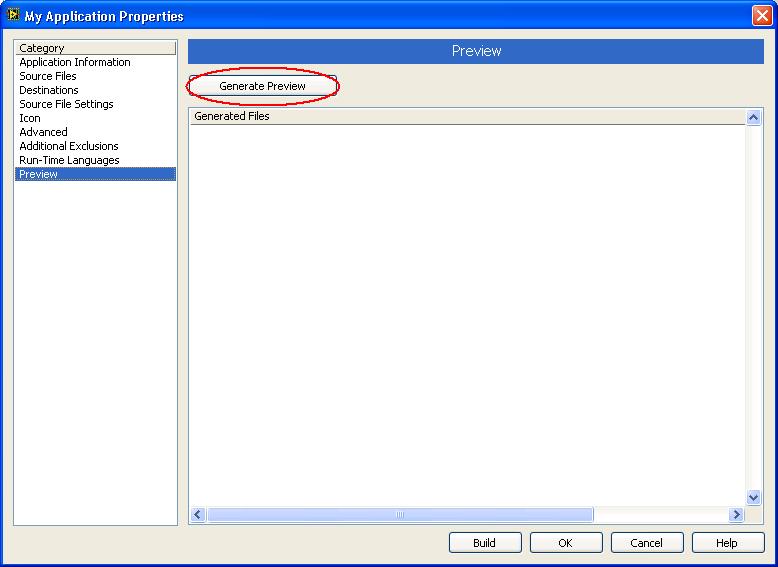
When you build your exe file from the Project Explorer, take a look at the
Generate Preview Option (shown below) to ensure that all the necessary support
files have been included. 
<img src="Loading Image...">


The options (remove/show panel, run when open) for sub-VI's
are located in that sub-VI under File »
VI Properties » Execution.

Please let me know if you have any more questions.&nbsp; Best of luck on your
application, and have a great day!!


Message Edited by cphuong on 01-30-2007 09:53 PM


GeneratePreview.JPG:
http://forums.ni.com/attachments/ni/170/227022/1/GeneratePreview.JPG
Gee Chin Lin
2007-01-31 06:40:07 UTC
Permalink
Hi Ching P.:
&nbsp;
Thanks for your reply. I&nbsp;was using Project Exprorer. The missing subvis are actually from vi.lib. I also did&nbsp;expand the dependency folder and saw all the missing subvis in it. Aren't these VIs will become part of the .exe after build? Or will they become external dependency file? Do I need to manually include them in the Project Explorer? I then try to build the installer from the .exe file and with only the RunTime engine 8.2 included (selected from Additional installer option) and it works at the target PC. So I don't know what is the different between:
&nbsp;
build an .exe and run it on a PC with the RunTime engine 8.2 pre installed&nbsp;&nbsp;&nbsp;&nbsp; AND
build the installer with the RunTime engine 8.2 included and install and run it on a PC
&nbsp;
I also did try to build the installer wihtout the RunTime engine 8.2 included and install and run it on a PC with the RunTime engine 8.2 pre installed. But it did not work.
&nbsp;
For the 2nd part, I found the configuration option for the subvi as you mentioned below. But it is still different from 6.02 application builder where this option is available&nbsp;in the builder windows itself. It is under VI setting tab. I still find the 8.2 Project Explorer very slow when I try to navigate around with the available option exspecially when I click the properties of a builder specification and&nbsp;also when I click cancel and OK button afterward.
&nbsp;
Thank you.
&nbsp;
Chin Lin
cphuong
2007-02-01 02:10:08 UTC
Permalink
Hi Chin Lin,

One other thing to try manually add the NI_AALPro.lvlib as a support file in
the Application Builder Wizard by first putting the library in the
project.&nbsp;

With regards to your other question about the speed of the application builder,
how large is your application?&nbsp; Also, how much available RAM do you
have?&nbsp; While the application builder runs, it stores a copy of each VI
that is part of the application in memory.&nbsp; If you have a very large
application or not enough RAM, this can slow your PC down.&nbsp;

How are you determining that it takes longer to build an application in LabVIEW
8.20?&nbsp; Are you trying to build an application that you once built in
LabVIEW 6?&nbsp; Is it the same exact application?&nbsp;

I wish you the best of luck on your application, and hope to hear from you
soon!!
Gee Chin Lin
2007-02-01 12:40:08 UTC
Permalink
Hi Ching P.:
I tried adding the NI_AALPro.lvlib to the project as the support file but getting this error when building the .exe:"Polymorphic VIs cannot be used as Startup/Exported or Dynamic VIs for applications or shared libraries.C:\Program Files\National Instruments\LabVIEW 8.2\vi.lib\analysis\_algsub.llb\Trace.vi"
I added the NI_AALPro by doing:1. Right click on My Computer-&gt;Add File...2. Select the NI_AALPro.lvlib from NI folder.3. Under Build Specification, right click on my project -&gt;properties.4. Under the Source Files , select NI_AALPro.lvlib. Move it under Dynamic VIs and Support Files.5. Under the Source File Settings, select NI_AALPro.lvlib. Under Destination to apply, I selected &lt;my project name&gt;.exe.6. Build the .exe.
At step 5, I also tried selecting the Support Directory and failed also.I remember I read it some where which mentioned that for Polymorphic VIs, we can only include the instand of the VI but not the VI itself. But how to include just the instand of the VI?
My actual project .exe file size is about 40MB when compile under Labview 6.0.2. When using Labview 8.2, the size is about 27MB. The project that I build using Labview 6.0.2 &amp; Labview 8.2 are the same project but with slightly different due to ongoing modification. But they should not differ much on the building time. My system is a Dell Precision PWS380 Pentium 2.8GHz with 1GB RAM. I noticed that a few times that the build time took only about 14 minutes to complete which is close to using Labview 6.0.2 (13 minutes). But most of the time is slow (about 25 - 30 minutes). Need more time to verify on this.
Thank you.Chin Lin
Gee Chin Lin
2007-02-05 11:40:10 UTC
Permalink
Hi Ching P.:
Yes, the lvanlys.dll was included in the build for all my previous attempts. Now I am getting error as attached file.
I noticed that my RunTime Engine 8.2 was not listed as one of the installed Labview software under the "add/remove program"&nbsp;and also "add/remove program"-&gt;"National Instructments Software". It only appears in Measurement &amp; Automation Explorer. I reinstalled RTE8.2 without uninstalled the RTE8.2 first and did not works. I then tried uninstalled and reinstalled the RTE8.2. This time my simple labview program work and I can see the RTE8.2 under "National Instructments Software".
So thank you for your help. I still don't know why it happened this way. Are you able to build and run&nbsp;a simple vi with any library vi in c:\Program Files\National Instruments\LabVIEW 8.2\vi.lib\Analysis\NI_AALPro.lvlib&nbsp;included on a PC with the RTE8.2 only? I attached the simple vi that I used.
Thank you.
Chin Lin


LINEAR_FIT_ERROR.JPG:
Loading Image...


LinearFit_test.zip:
http://forums.ni.com/attachments/ni/170/227907/2/LinearFit_test.zip
cphuong
2007-02-07 01:10:08 UTC
Permalink
Hi Chin Lin,

I was able to build both the application (exe file) and the installer without
error.&nbsp; Without the ability to replicate the error, it is hard to say what
could have caused it.

In addition, it is normal not to see LabVIEW RunTime Engine 8.2 listed in the add/remove program"-&gt;"National Instruments Software".&nbsp;
After LabVIEW 7.1, we no longer list the Run-Time Engines in Add or Remove
Programs.

I'm glad to hear that everything is working well, and sorry
that I cannot give an explanation as to what was causing your issues.&nbsp;
Please let me know if you have any further questions.
Chin Lin
2007-02-07 02:10:08 UTC
Permalink
Hi Ching P.:
&nbsp;
I was able to build both .exe and installer also but has problem of deploying the .exe to run on a machine with the RTE8.2 installed. So did you try to run the .exe on a PC with RTE8.2 installed (without the Labview Development Software)?
&nbsp;
If the RTE is&nbsp;no longer&nbsp;listed under Add/Remove Program, then how are we uninstall it in the future? We have to&nbsp;run the installation software to uninstall it?
&nbsp;
In addition,&nbsp;after a few install/uninstall RTE8.2, why am I&nbsp;able to see it appears under the "add/remove program"-&gt;"National Instruments Software"?
&nbsp;
Thank you.
&nbsp;
Chin Lin
cphuong
2007-02-08 03:40:08 UTC
Permalink
Hi Chin Lin,

I was able to build the application and installer from you VI without
error.&nbsp; I then took this to a test machine that was free of any NI
software, and ran the installer without issue.&nbsp; The installer installed
the LabVIEW 8.2 Run-time engine and the program.&nbsp;

The run-time engine should not appear under Add or
Remove Programs » National Instruments Software if you have the
LabVIEW 8.20 Development Environment on your machine.&nbsp; If you need to
uninstall the run-time engine specifically you can contact National Instruments
Technical Support for details on how to do this.&nbsp; If you do not have any
National Instruments software on a computer, and install the LabVIEW 8.2
Run-time engine, that will appear under Add or Remove Programs » National
Instruments Software.

Please let me know if you have any further questions.&nbsp;
Best of luck on your application, and have a wonderful day!!
Chin Lin
2007-02-08 04:10:07 UTC
Permalink
Hi Ching P.:
&nbsp;
I think you still not very clear of my issue. I was able to use the installer and install my application on the target PC and run my application. But I can not use the .exe generated using the labview builder and run it on a PC with RTE8.2 preinstalled on that PC. So you should try build the .exe and then run it on a PC with RTE8.2 preintalled. Don't use the installer. It also works for me.
&nbsp;
The reason why I did not want to use the installer is because I already have an existing installer software to&nbsp;deploy my labview project. So I just one to build the .exe and adds this .exe to my own installer.
&nbsp;
Thank you.
&nbsp;
Chin Lin
cphuong
2007-02-09 16:10:14 UTC
Permalink
Hi Chin
Lin,

I was able to run the executable on a test machine.&nbsp; The test computer was
free of any National Instruments software.&nbsp; I installed the LabVIEW
Run-time Engine 8.2 from <a href="http://digital.ni.com/softlib.nsf/websearch/9bced01b8f69f8a0862571bf0078ff96" target="_blank">this</a>
website, then ran the executable file.&nbsp; The executable ran without error.

Did you try to run the same executable that you used to build your
installer?&nbsp; To build an installer, you need to first build and executable
that you include in the installer.&nbsp; Try using that executable, and see if
you still get the error.

Please let me know if you have any questions.&nbsp; Best of luck on your
application, and have a great day!!
J. Mondry
2007-02-13 13:40:07 UTC
Permalink
Hallo,
I had the identical problem and was able to determine it's cause (at least for me).
&nbsp;
What I (erraneously) did, was to install the wrong LV 8.2 Runtime on the target machine first (the "light" one [2x MB] for browsing VIs). Then I installed the proper 8.2 Runtime over it (since I could not uninstall the wrong one - it doesn't show either in "Add/Remove Programs" or in "National Instruments Software").
&nbsp;
When I then tried to run a freshly built 8.2 Executable on this taget machine then I got the very same error message about not finding the front panels of several *AA*.lvlibs ... the same error Chin Li got.
&nbsp;
So what worked for me is: radically clean the target machine of NI stuff (i.e. that being an XP machine I rolled it back to a day before I tried all this). Then I freshly installed the correct 8.2. Runtime (the big one) and now my executables run fine.
&nbsp;
So I think maybe the reason Ching P. couldn't reproduce Chin's problem is&nbsp;that he did&nbsp;exactly that on a real fresh machine and Chin's target machine only "looked" like fresh because the wrong RT still lurkes somewhere.
&nbsp;
It is very bad naming policy by NI by the way, to name both these thing "LabVIEW Runtime 8.2", lots of people will get confused ...
&nbsp;
hope this helps
Jens
Chin Lin
2007-02-14 01:40:09 UTC
Permalink
Hi Jens:
Thanks for your information. From the day one, I&nbsp;was using the correct RTE8.2. I was using the one in the Labview Professional Development System 8.2 CD. I then downloaded the RTE 8.2 from the NI website and they look the same and have the same size.
If what you said is correct, then this is very bad because&nbsp;not many have backup their system before installing any software.
I&nbsp;think my problem maybe due to the fact that my target system is not clean. The system has been used for running LV6.02 program with many other NI drivers installed (DAQ, VISA,....). I am investigating converting my LV6.02 program to LV8.2 to deloy&nbsp;it to my production machines.&nbsp;I&nbsp;can not clean them before installing RTE 8.2. This is just not acceptable. Hofully this is not the root cause.
Thank you.
Chin Lin
Chin Lin
2007-02-27 09:10:08 UTC
Permalink
Hi:
I finally found out the root cause. Initially I installed the LV RTE 8.2 from the NI Labview 8.2 Dev CD which getting error when running the vi .exe. I then go to the NI website to download the RTE 8.2 which is about 94MB. When executing the setup.exe, there were 5 items to select for installation:
NI Labview RTE 8.2Variable EngineDatasocketLabview Deployable LicenseUSI
I selected only NI Labview RTE 8.2. When installing in progress, I noticed that there were 7 parts in total (these are part of the package and can not be unchecked):NI EULA DepotNI MDF SupportNI Logos 4.7NI Labview RTE 8.2NI Math Kernel LibrariesNI Service LocatorNI TDMS
After installation, the .exe file was able to execute without problem. So by just installing the RTE 8.2 (lv82runtime.msi), it won't work. Then I uninstalled all the components of RTE8.2 and installed just the NI Labview RTE 8.2 and NI Math Kernel Libraries from my NI Labview 8.2 Dev CD. Now it also work.
So in summary, we need to use the RTE 8.2 from the NI website to install which will automatically install the extra components for us to get the .exe work. I was wrong to assume that we need only the RTE 8.2 to run&nbsp;a&nbsp;labview&nbsp;.exe.
Thank you.
Chin Lin
&nbsp;
nokia
2008-04-22 17:40:10 UTC
Permalink
I found another reason for the above problem. I had problems with vi not being included in the build. After I cleared the graphs (with lots of default data)&nbsp; the size of the vi that was causing problems shrunk from 10Mb to 0,5Mb and the problem was gone.Maybe that helps anybody.
FieldKam
2008-04-23 14:10:06 UTC
Permalink
Hey nokia! Thank you for sharing your solution with the NI Community!&nbsp; Have a great day!
Loading...